Build Your GitHub Network Using Code
Introduction
Tired of manually clicking Follow
on GitHub? Let us build a bot that does the heavy lifting! This project combines Python for data scraping, Node.js for API interactions, and the power of the GitHub REST API to automate following users at scale. It is a perfect weekend project to level up your coding skills and expand your GitHub network.
What You will Gain:
- Data Mining Skills: Learn how to extract valuable information from GitHub using Python and Selenium.
- API Expertise: Understand how to interact with the GitHub API using Node.js and handle rate limits.
- Automation Mastery: Build a bot that runs autonomously which frees you from repetitive tasks.
Step One: Collect accounts you wish to follow
For this part of the project, you need to come up with a list of accounts to follow. You can gather these accounts from popular repositories, contributors, or any other sources that align with your interests. In this tutorial, we will use a script to collect GitHub users who have starred popular repositories.
Prerequisites
-
Python and Selenium: Ensure you have Python installed. Install Selenium using pip if you have not already:
pip install selenium -
WebDriver: Download the ChromeDriver or any other WebDriver compatible with your browser.
Script to Collect Accounts
Here is a Python script that uses Selenium to extract the usernames of people who have starred popular GitHub repositories:
from selenium import webdriver
from selenium.webdriver.support.ui import WebDriverWait
from selenium.webdriver.support import expected_conditions as EC
from selenium.webdriver.common.by import By
from selenium.common.exceptions import NoSuchElementException, TimeoutException
import time

chrome_options = webdriver.ChromeOptions()
driver = webdriver.Chrome(options=chrome_options)
accounts_followed = 0

try:
    driver.get("https://github.com/login")

    username = WebDriverWait(driver, 10).until(
        EC.presence_of_element_located((By.ID, "login_field"))
    )
    password = WebDriverWait(driver, 10).until(
        EC.presence_of_element_located((By.ID, "password"))
    )

    # Replace with your GitHub credentials
    github_username = "your_github_username"
    github_password = "your_github_password"

    username.send_keys(github_username)
    password.send_keys(github_password)

    login_button = WebDriverWait(driver, 10).until(
        EC.element_to_be_clickable((By.NAME, "commit"))
    )
    login_button.click()
    time.sleep(10)

    urls = [
        "https://github.com/freeCodeCamp/freeCodeCamp",
        "https://github.com/EbookFoundation/free-programming-books",
        "https://github.com/sindresorhus/awesome",
        "https://github.com/public-apis/public-apis",
        "https://github.com/jwasham/coding-interview-university",
        "https://github.com/kamranahmedse/developer-roadmap",
        "https://github.com/996icu/996.ICU",
        "https://github.com/donnemartin/system-design-primer",
        "https://github.com/facebook/react",
        "https://github.com/facebook/react-native",
        "https://github.com/facebook/docusaurus",
        "https://github.com/facebook/hhvm",
        "https://github.com/facebook/lexical",
        "https://github.com/openai/openai-cookbook",
        "https://github.com/openai/whisper",
        "https://github.com/openai/evals",
        "https://github.com/openai/openai-python",
        "https://github.com/openai/tiktoken",
        "https://github.com/openai/openai-node",
        "https://github.com/codecrafters-io/build-your-own-x",
    ]

    for url in urls:
        for i in range(0, 100):

            page = i

            try:
                if page == 0:
                    driver.get(f"{url}/stargazers")
                else:
                    driver.get(f"{url}/stargazers?page={page}")
            except TimeoutException:
                print("TimeoutException")
                break

            start_time = time.time()  # Start time for 60 seconds duration
            try:

                people_to_follow = WebDriverWait(driver, 3).until(
                    EC.visibility_of_any_elements_located(
                        (By.XPATH, "//a[@data-hovercard-type='user']")
                    )
                )
                with open("people_to_follow.txt", "a") as f:
                    for person in people_to_follow:
                        f.write(person.text + "\n")

            except NoSuchElementException:
                print("Element not found")
                break
            except Exception as e:
                print(e)
finally:
    driver.quit()
This script logs into your GitHub account and navigates through the stargazers of several popular repositories, collecting usernames into a text file. To add more accounts to your followers list, you can run this script multiple times, appending new usernames to people_to_follow.txt each time.
In the next step, you will use a Node.js script to read the collected usernames from the file and follow each account. You will utilize the GitHub API for this purpose.
Step Two: Automate Following Users with Retry Mechanism Using Node.js
To automate the process of following GitHub users with a retry mechanism in case of rate limits or other errors, you can use the provided Node.js script. This script utilizes the GitHub API to follow users listed in a text file, incorporating exponential backoff for retrying failed attempts.
Prerequisites
-
Node.js: Ensure you have Node.js installed.
-
GitHub Personal Access Token: Generate a personal access token from your GitHub account settings.
-
Required Packages: Install the required packages using npm:
npm install @octokit/core node-fetch
Script to Follow Users with Retry Mechanism
Here is the complete script to follow GitHub users, incorporating exponential backoff for retries:
// Import the necessary modules
import { Octokit } from '@octokit/core';
import { readFileSync } from 'fs';
import fetch from 'node-fetch';

// Replace 'YOUR_PERSONAL_ACCESS_TOKEN' with your GitHub personal access token
const octokit = new Octokit({ auth: 'YOUR_PERSONAL_ACCESS_TOKEN', request: { fetch } });

// Function to read users from a text file synchronously
function readUsers() {
    const users = readFileSync('people_to_follow.txt', 'utf-8')
        .split('\n')
        .map((user) => user.trim())
        .filter((user) => user.length > 0);
    return users;
}

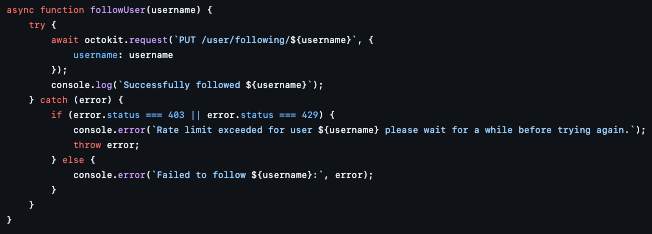
// Function to follow a user
async function followUser(username) {
    try {
        await octokit.request(`PUT /user/following/${username}`, {
            username: username,
        });
        console.log(`Successfully followed ${username}`);
    } catch (error) {
        if (error.status === 403 || error.status === 429) {
            console.error(`Rate limit exceeded for user ${username}. Please wait for a while before trying again.`);
            throw error;
        } else {
            console.error(`Failed to follow ${username}:`, error);
        }
    }
}

// Function to follow all users in the list with retry mechanism
async function followUsers(users) {
    for (const user of users) {
        let retryCount = 0;
        let oneMinute = 60000;
        // Exponential backoff strategy until 64 minutes
        let retryTimes = [
            oneMinute,
            oneMinute * 2,
            oneMinute * 4,
            oneMinute * 8,
            oneMinute * 16,
            oneMinute * 32,
            oneMinute * 64,
        ];

        while (retryCount < retryTimes.length) {
            try {
                await followUser(user);
                break; // Exit the retry loop on success
            } catch (error) {
                if (error.status === 403 || error.status === 429) {
                    let delay = retryTimes[retryCount];
                    console.log(`Waiting for ${delay / 60000} minutes before retrying...`);
                    retryCount++;
                    await new Promise((resolve) => setTimeout(resolve, delay));
                } else {
                    break; // Exit the retry loop on non-rate-limit errors
                }
            }
        }

        if (retryCount === retryTimes.length) {
            console.error(`Failed to follow ${user} after 7 retries.`);
        }
    }
}

// Main function to execute the script
async function main() {
    const users = readUsers();
    await followUsers(users);
}

// Start the process
main();
Note: This script should be run in the same folder as your Python script so that the people_to_follow.txt file is accessible. The code processes each username from the file and uses the GitHub REST API to follow them. Due to API rate limits, the script employs an exponential backoff strategy for retries, waiting progressively longer between each attempt.
So basically, that is the entire script. To summarize:
- The Python script logs into your GitHub account, navigates through the stargazers of several popular repositories, and collects usernames into a
people_to_follow.txtfile. You can run this script multiple times to add more usernames to the file. - The Node.js script reads the
people_to_follow.txtfile, processes each username, and uses the GitHub REST API to follow them. Because the API is rate-limited, the script employs an exponential backoff strategy for retries, waiting progressively longer between each attempt.
Important Notes:
- Both scripts should be run in the same directory to ensure the
people_to_follow.txtfile is accessible. - Replace
YOUR_PERSONAL_ACCESS_TOKENin the Node.js script with your actual GitHub personal access token.
Step 3: Supercharge Your Growth: Deploy to AWS EC2 (Optional)
Ready to take your Github follower game to the next level? Let uss unleash the power of automation and scale. By deploying your Node.js script to an AWS EC2 instance, you arere giving it a turbocharged engine to handle massive growth and run 24/7.
Why EC2?
Think of it like moving from a bicycle to a sports car. EC2 gives you:
- Reliability: Your script keeps running smoothly, even if your computer goes offline.
- Scalability: Handle a huge list of potential followers with ease.
- Performance: Your script becomes a follower-gaining machine.
Prerequisites (Before You Hit the Gas)
- AWS Account: You will need an AWS account to access their cloud services.
- EC2 Instance: This is your virtual server. Think of it as the engine for your script. If you don not have one, follow this quick guide to create an EC2 instance.
- GitHub Repository: Your script and
people_to_follow.txtneed a home. Push them to a GitHub repo.
Deploying the Script (Let us Get Technical!)
- Connect to Your EC2 Instance: Use SSH or the handy AWS EC2 Instance Connect to log into your virtual server.
ssh -i /path/to/your-key-pair.pem ec2-user@your-ec2-instance-public-dns- Tool Up:
Install Node.js and Git on your EC2 instance.
sudo yum update -y sudo yum install -y nodejs git - Clone Your Repo:
Bring your script from GitHub to your EC2 instance.
git clone <github_repo_clone_url> cd github_follow_code - Install Dependencies:
Get all the Node.js packages your script needs.
bash npm install - Run in the Background (Let It Rip!):
Use
nohupto keep your script running 24/7, even after you log out.
nohup node follow_users.js &Conclusion
Your script is now running in the background on your EC2 instance. Sit back and watch the number of people you follow soar!